
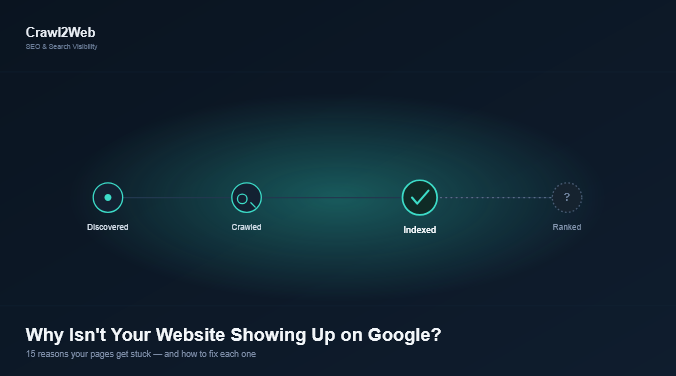
If you search your website’s name or a keyword you should rank for and nothing shows up, only two things can be happening: either Google hasn’t indexed your page yet, or it has indexed the page but isn’t ranking it for that search. These are different problems with different fixes, and most confusion here comes from mixing them up. This guide covers how to tell them apart, then 15 specific reasons your site might not be showing up, with a fix for each.
How Do I Check If My Website Is Indexed by Google?
Before troubleshooting anything, confirm whether your page is indexed at all.
- Use a site: search. Type
site:yourdomain.cominto Google. If pages appear, part of your site is indexed. Usesite:yourdomain.com/exact-page-urlfor one specific page. - Use Google Search Console’s URL Inspection tool. More reliable than a site: search — it shows whether the URL is on Google, when it was last crawled, and whether indexing or crawling is blocked.
- Check the Page Indexing report. Under Indexing → Pages, this groups non-indexed URLs by reason, answering most “why isn’t my site showing up” questions in one place.
If you haven’t set up Search Console yet, verifying your site in Search Console is the first step before any other fix will matter.
Why Is My Website Indexed but Not Showing in Google Search Results?
This is a ranking problem, not an indexing problem. Google has the page in its index but isn’t choosing to show it for the keywords you’re searching — usually due to competition, content depth, relevance, or the site not yet having enough authority signals for that term. Keep this distinct from the issues below, where the page isn’t in the index at all.
15 Reasons Your Website Isn’t Showing Up on Google (and How to Fix Each)
1. Your website is brand new
Google needs to discover your site before it can crawl or index it. A domain with no sitemap, no backlinks, and no internal signals can sit undiscovered for days or weeks. Fix: Submit an XML sitemap in Search Console and request indexing on your key pages through the URL Inspection tool.
2. Your site isn’t indexed at all
If a site: search returns nothing, Google hasn’t added your pages to its index yet. Fix: Check the Page Indexing report to see why, then submit a sitemap and request indexing on priority URLs.
3. robots.txt is blocking Googlebot
Yes — robots.txt can absolutely stop your site from appearing on Google. If your robots.txt file disallows a folder or the entire site, Googlebot simply won’t crawl those pages. Fix: Visit yourdomain.com/robots.txt and check for Disallow: / or blocked directories that shouldn’t be blocked. Remove the rule and re-test with the URL Inspection tool’s “Crawl allowed?” check.
4. A noindex tag is present
A noindex meta tag or HTTP header tells Google explicitly not to index a page, even if it can crawl it perfectly. This is common after a site migration, a staging site going live without changes, or a CMS/SEO plugin misconfiguration. Fix: View the page source or check “Indexing allowed?” in URL Inspection. Remove the noindex tag if the page should be public, then request indexing.
5. Status: “Crawled – currently not indexed”
This means Googlebot visited the page, evaluated it, and chose not to index it — usually because the content doesn’t add enough unique value compared to what’s already indexed. Fix: Improve the content’s depth and originality, strengthen internal links pointing to it, and resolve any duplication. Only request re-indexing after making real changes; resubmitting an unchanged page rarely helps.
6. Status: “Discovered – currently not indexed”
This means Google knows the URL exists (from a sitemap or a link) but hasn’t crawled it yet — often due to crawl budget limits, a slow server, or low perceived priority. Fix: Improve site speed, strengthen internal linking to the page, remove low-value duplicate URLs that waste crawl budget, and make sure the page is included in your sitemap.
7. Duplicate or thin content
Pages that closely resemble other pages, or that offer very little original content, often get crawled but excluded from the index because a similar page already satisfies the query. Fix: Consolidate near-duplicate pages, use canonical tags correctly, and expand thin pages with genuinely useful, original information.
8. The page has no internal or external links pointing to it
Orphan pages — pages with zero links from anywhere else on your site — are hard for Google to find and are often treated as low priority. Fix: Link to the page from relevant existing content and make sure it’s included in your sitemap and site navigation where appropriate.
9. Technical SEO problems
Slow page speed, broken redirect chains, incorrect canonical tags, unrendered JavaScript content, or a poor mobile experience can all interfere with crawling, indexing, or ranking. Fix: Run your site through Search Console’s Core Web Vitals and Mobile Usability reports, fix redirect and canonical errors, and confirm your content renders without relying solely on JavaScript.
10. Server errors or downtime during crawling
If Googlebot repeatedly hits 5xx server errors or timeouts when trying to reach your site, it will slow down or pause crawling. Fix: Check the Crawl Stats report in Search Console for spikes in server errors and work with your host to resolve uptime or response-time issues.
11. No sitemap submitted
Without a sitemap, Google has to rely purely on links to discover your pages, which is slower and less reliable, especially for new or large sites. Fix: Generate an XML sitemap and submit it under Indexing → Sitemaps in Search Console.
12. A manual action or spam issue
In rare cases, Google removes or demotes a site for violating its spam policies. Fix: Check Security & Manual Actions in Search Console. If an action is listed, fix the underlying issue and submit a reconsideration request.
13. Low domain trust for a new site
New websites, especially with few or no backlinks, often take longer to earn visibility because Google has limited signals to evaluate the site’s reliability for competitive queries. Fix: Earn relevant backlinks over time, keep publishing genuinely useful content, and be patient — this is a gradual signal, not a one-time fix.
14. Wrong or missing canonical tags
If a page’s canonical tag points to a different URL, Google may index that other URL instead of the one you’re searching for. Fix: Confirm each important page has a self-referencing canonical tag unless you intentionally want it consolidated elsewhere.
15. Content doesn’t match search intent
A page can be perfectly indexable and still not appear for a keyword if it doesn’t actually answer what people searching that term want. Fix: Review the top-ranking pages for your target keyword and make sure your content format and depth genuinely match what searchers expect.
How Long Does It Take for a New Website to Appear on Google?
There’s no fixed timeline. Some pages get indexed within hours; others take days or weeks, particularly for brand-new domains with no existing authority. Submitting a sitemap and requesting indexing can shorten the wait, but neither guarantees a specific timeframe — Google still evaluates the page before including it.
How Do I Submit My Website to Google for Indexing?
- Verify your site in Google Search Console.
- Create and submit an XML sitemap under Indexing → Sitemaps.
- For individual priority pages, paste the URL into the URL Inspection tool and click Request Indexing.
- Monitor the Page Indexing report over the following days to confirm the page moves to “Indexed.”
Note that Request Indexing adds a URL to a priority crawl queue — it doesn’t force indexing. Google still applies its normal quality evaluation.
Why Does My Website Show Up When I Search the URL but Not My Keywords?
This confirms the page is indexed — the problem is ranking, not indexing. If typing your exact URL or brand name finds the page but your target keywords don’t, the content isn’t currently considered relevant or competitive enough for those searches. Focus on content depth, search intent match, and internal linking rather than indexing fixes.
Do Backlinks Help a New Website Appear in Google Search?
Backlinks can help Google discover new pages faster and can contribute to how a site is evaluated for competitive keywords over time. They aren’t a substitute for indexable, crawlable content, and there’s no fixed number of links that guarantees appearance — quality and relevance matter more than volume.
How Can Google Search Console Help Identify Indexing and Visibility Problems?
Search Console is the most reliable diagnostic tool available, and it’s free:
- Page Indexing report — shows exactly why each non-indexed URL was excluded.
- URL Inspection tool — checks crawl and index status for one URL at a time, plus live testing.
- Performance report — shows impressions and clicks for indexed pages, which separates indexing problems from visibility/ranking problems.
- Sitemaps report — confirms Google successfully processed your sitemap.
- Core Web Vitals & Mobile Usability — flag technical issues that can affect ranking.
What Should I Do If My Website Is Indexed but Still Gets No Impressions or Traffic?
Check the Performance report in Search Console. If impressions are at or near zero for indexed pages, your content likely isn’t matching any meaningful search queries yet. Review your target keywords against actual search demand, strengthen internal linking to the page, and compare your content against what’s currently ranking for those terms. This is a content and relevance issue, not an indexing one.
FAQ
Can I make Google index my site instantly?
No — requesting indexing raises crawl priority but doesn’t guarantee immediate indexing.
Does a new domain start with a ranking disadvantage?
Often yes, due to limited authority signals, though this improves with quality content and links over time.
Is “Discovered – currently not indexed” bad for SEO?
Not inherently — it’s common for new or low-priority pages and often resolves on its own.
Can too many pages be blocked by robots.txt by mistake?
Yes, and it’s one of the most common accidental causes of a site disappearing from Google.
Should I request indexing every time I update a page?
Only for meaningful updates — Google generally finds routine changes on its own.